
Can you, by yourself, use all the recent advancements in AI to create your own TV series on YouTube, starting with say 5 minute episodes? That is the challenge I have set myself to explore, writing blogs of my findings as I progress.
My background: I have been text-based AI (ChatGPT, Gemini, Claude, etc) with more traditional 3D animation (Unity, Omniverse, three.js, etc.), taking a written story or screenplay can converting it into scenes, character actions (body movements, facial controls, test to speech coordination, lip sync), and camera shots. This lets story tellers write a story without having to learn complex tools. For myself, my goal is to create episodes faster: if I can get the AI to do a good enough job from text descriptions alone, I can spend more time on crafting stories. I have been working on this using techniques like chaining Mixamo.com animation clips and then layering on top what I call procedural animation (using code to compute angles to turn a head and eyes to look at a specific target). It’s a hobby project, so progress has been slow. But can I use the same approaches with generative AI for video?
Why now? Simple really – I recently got a new desktop with an RTX 5090 with 32GB of VRAM and empty disks. So I now have the hardware to explore on my desktop.
To kick this series off, I thought I would run through all the problems I faced with the older form of animation. Later blogs will look deeper into specific challenges.
Voices
I want multiple characters with different voices. As this is aimed at solo creators, it means I cannot use my own natural voice.
Why do I start with voice? YouTube videos engage two of our five senses: sight and sound. Audio quality has a significant impact on perception of the end result, yet is generally much easier to generate than the video.
There are two paths then for voice synthesis.
- Text to Speech: You type in what you want the computer to say and get back an audio file. Text to speech has been improving in quality, including improving support for emotional markers in the text. The depth of vocal acting depends on the quality of the algorithm. Text to speech is convenient for written story to video production – you type in dialog, no need for a recording set up or quiet location to record in.
- Voice Changers: Speech to speech is another approach where it makes your voice sound like another character. This allows you to record yourself as a voice actor, given you greater emotional control over the delivery.
There is another impact of the choice. How are the characters mouths going to be controlled by the audio in the video?
- Audio to face poses: You can use AI to recognize facial movements from an audio clip then apply facial movements to the target character. For example, an “ooooh” sound has puckered mouth where as an “eeeek” sound stretches the mouth open wide. This can work well with audio files generated by text to speech algorithms.
- Video to video transference: In this approach, you need a facial recording that lines up with the audio track. Using voice changes works well here as you can record the audio and video together, then feed it through separate audio (voice changer) and video (face capture) AI processing chains.
Character Consistency and Control
An import challenge with 3D animation is you need to design 3D models for your characters, props, and background sets. Personally I found that backgrounds can take a long time to set up and create, which comes time consuming if your characters visit a location only once. Generative AI opens up interesting alternatives with text to image generation. You can generate once-off static backgrounds relatively quickly, although you need to take care to make sure the images are all in a consistent style (Disney cartoon? Photorealistic? Etc.)
In GenAI, you can train up your own model for a character called a Lora. You can use AI to generate a single 2D image, but best results with Loras are achieved by creating a set of images of the same character from different angles. So there is still a degree of effort for each new character. Currently I am thinking of these models more like a “special prompts” for the video generation model. Instead of inputting text, an image is provided for reference.
Character consistency is not a new problem with GenAI. Popular models have a skeleton support built in. Feed in an OpenPose pose and the generative AI model attempts to make the character follow the pose. The pose is represented as a skeleton with markers for key face positions. There is also face controls for lip-sync and emotions.
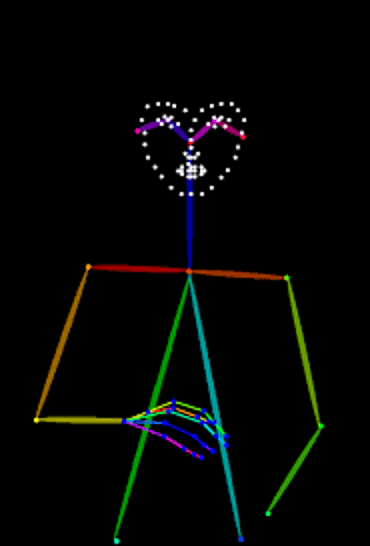
Animation can be controlled by animating poses, then using image generators to create the video frame by frame, with special logic for consistency across frames.
Facial Expressions
In traditional 3D models, a common approach is to use a skeleton for the body (you rotate bones at joints to make legs and arms move) and “blend shapes” (aka morphs) to adjust the facial mesh to open the mouth. AR Kit for example defines over 50 partial facial blend shapes that can be combined to create a variety of expressions. One blend shape might move the left eyebrow up, whereas another curves the right side of the mouth down. Libraries such as Google MediaPipe can convert video into such movements.
With the newer AI techniques, there are different approaches that different AI models support, including video to video transference of facial expressions. This allows an actor (you!) to record your face with say a mobile phone, and then transfer that clip over onto the video. But there are also options for text to video with facial expressions.
Consistent Backgrounds
It is common to have a scene where two characters talk to each other. The camera typically cuts between the characters for more visual interest. In traditional 3D generation, you would create a 3D model of the background set. It can be expensive to create such background models.
In GenAI, you also have a different problem. Generative AI can different images from the same text prompt. If you have a scene in a room with two characters talking, with the camera jumping around the room from different angles, you need the characters and backgrounds to look consistent.
One benefit I had with Unity is there is an asset store with a range of 3D models for sets. By using the models, the camera can be pointed in any direction or used in sweeping pans with consistent backgrounds. This is frequently harder with the more modern AI techniques. Camera movement is generally more limited.
Another nice feature can be for backgrounds to animate as well. For example, trees swaying gently in the wind or blades of grass in a field.
Putting it Together
With traditional 3D, these individual techniques can usually be controlled separately. There are added complexities, like lighting and environmental control, but the result is pretty predictable.
With AI, this can be harder to achieve. However some models have increasing support to allow different inputs to supply backgrounds, characters, voices, camera movements/positioning, and more. This makes it easier to combine all the result together.
Hybrid approaches may at times also be useful. For example, it may be useful to use a tool like Unity to control a character that looks like the OpenPose model. That can then be fed into the AI generation libraries. So it may not be traditional 3D rendering OR AI, but rather using both depending on the needs of a particular camera shot.
What did I Miss?
Lots. The list gets pretty long pretty quickly. Here are some extra considerations.
- Can a character be instructed to reliably look at another character?
- Can a character’s head track another character as it moves?
- Can a character thump its fists on the table?
- Can a character sit down in a chair behind a desk? Part of the character is obscured by the desk (e.g. legs), the other part of the body is in front of the desk. This challenge of an object both in front of another object and behind.
- How sophisticated can you be with instructions for LLM set up, LLM be used with lip-sync.
- Hair and cloth physics are also a constant problem. Character models need to be rigged tested, appropriately.
- And what about bouncing balls or similar – how to make them bounce, roll away, in a natural way.
- Can I position the camera appropriately, or do I need to use OpenPose to position characters in a scene more reliably.
- Can I do camera movements? Pan, zoom, closeup, top down view, tracking, etc. Does the background “look correct” or not through such camera movements.
- What about props in a scene? Can a character ride in car, ride on a scooter, drink from a cup?
- Can characters open doors (using a door handle)?
- What about video quality and upscaling? What tools work the best?
And of course there is more
- Can processing of videos be automated with slow tasks running as background jobs overnight. (One video showed that 10 seconds of video can take many hours to render.)
- Can AI help with color grading of content, to ensure a consistent look and feel.
- How to control lighting (such as moonlit darkness with shadows). How to do special lens flare or god-rays?
- How to control environments? Sun vs rain, sleet and ice versus terrible conditions, swaying trees, and so on.
- Can AI help with combining different images, getting details such as lighting correct? Can that be used to create individual acting of characters, then merge several characters and background images together, tweaking details such as the lighting to look consistent across all the merged images.
- Crowd animation, where you have many characters walking around a scene.
- Run lengthy jobs in background queues for multiple lengthy tasks, so rendering can run overnight.
Conclusions
This post was just to share that I plan to start digging into specific problems. There is a lot to work though. Should be a fun journey!
 Extra Ordinary, the Series