
I have been working on getting a VRoid Studio character imported into NVIDIA Omniverse. VRoid Studio is free software by Pixiv for creating 3D avatars. You have less control than a product such as Character Creator from Reallusion, but the price is great! It can be useful to explore animation if you don’t have the budget for more professional software. While still a work in progress, I managed to get past a first stumbling block of getting a character into NVIDIA Omniverse. This post describes the changes I made, with a bit of a dive into how USD captures character skeletons.
The Problem
VRoid Studio can export files in VRM format, but there is no VRM importer for NVIDIA Omniverse. VRM is basically GLB with some conventions, so I renamed the exported file from .vrm to .glb and then was able to right click on the GLB file and select “convert to USD”. This brought across the textures pretty well with bones. However, it skipped over the root bone and blendshapes were lost.
Unfortunately, Omniverse wants the root bone present for its skeleton retargeting. Without it, animation clip retargeting is not possible.
I reported a possible bug to NVIDIA in the forums, provided a sample character, so hopefully they will agree it’s a bug and eventually fix it. For example, if I convert the GLB file into FBX using Blender, the use Omniverse to convert the FBX file into USD, then it keeps the root bone but loses all the materials. This process was still useful however as it gave me a reference point to compare the USD output of GLB->USD and GLB->FBX->USD conversion pipelines.
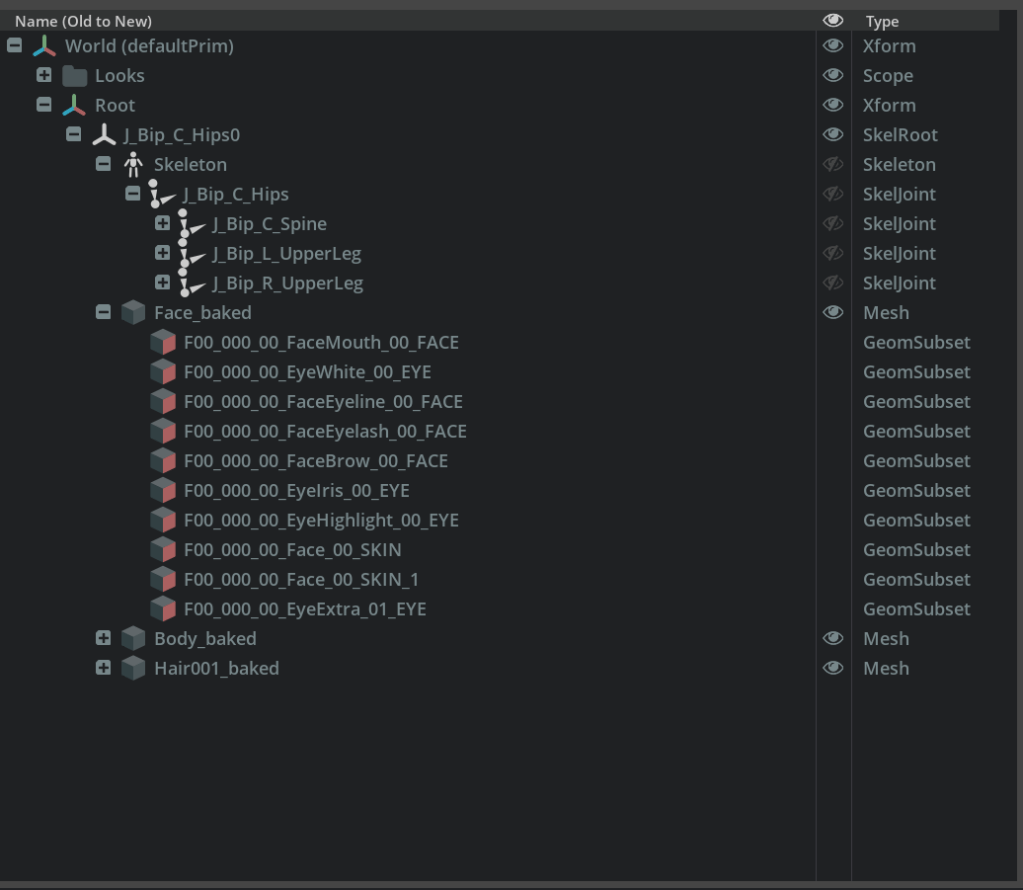
This is the prim hierarchy before running my script to correct the USD file. Notice under Skeleton is J_Bip_C_Hips, and not the character Root bone.
This is the primary hierarchy after running the script. Notice there is now a Root prim under the Skeleton prim.
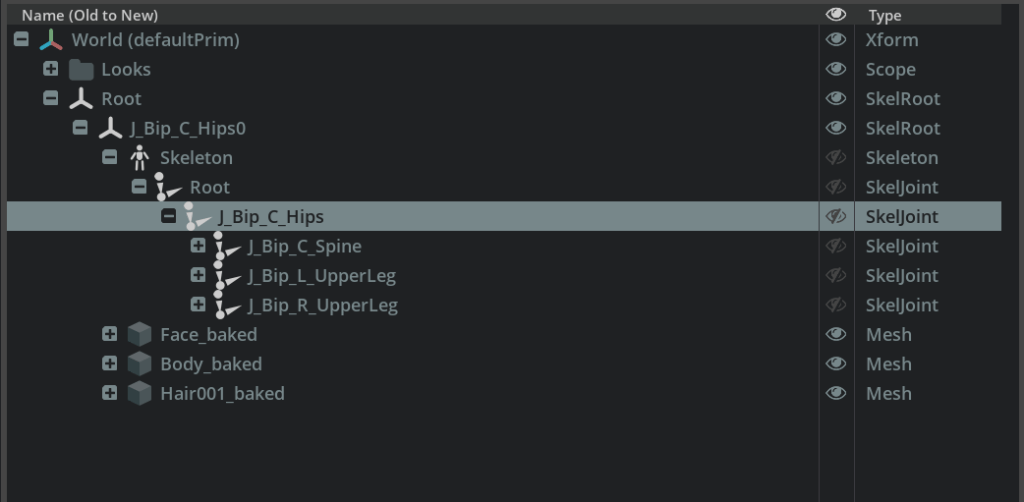
In fact, the above hierarchy of bones under the Skeleton prim is computed for you.
Summary of Changes
I had tried a few approaches to convert the model across, but they often crashed Omniverse. So instead I sat down and went through every property I could find related to skeletons, retargeting, and meshes to understand the ones used by the supplied USD file. In this blog I focus on the properties required to get a VRoid Studio character working on Omniverse. There are more properties that can occur on characters which I might write up later – it was interesting to learn how they all work.
Overall the changes are:
For the Skeleton prim
- Insert the Root bone into to the joints array
- Prepend Root/ to all the other joint paths in the array
- Add an identity matrix4d to the front of the bindTransforms array
- Add an identity matrix4d to the front of the restTransforms array
For each Mesh prim
- Prepend Root/ to each value in the skel:joints array, except for the blank string at the start
Skeleton.joints
The joints property of the Skeleton prim holds an array of all the joint names known in the skeleton. The default imported character had the following attributes
  uniform token[] joints = [
    "J_Bip_C_Hips",
    "J_Bip_C_Hips/J_Bip_C_Spine",
    "J_Bip_C_Hips/J_Bip_C_Spine/J_Bip_C_Chest",
    ...
    "J_Bip_C_Hips/J_Bip_R_UpperLeg/J_Bip_R_LowerLeg/J_Bip_R_Foot/J_Bip_R_ToeBase/J_Bip_R_ToeBase_end"
  ]
The problem is this skipped over the Root bone in the character. So the above needs to be changed to add a new Root node at the front, then Root/ needs to be prepended to each value in the array.
  uniform token[] joints = [
    "J_Bip_C_Hips",
    "J_Bip_C_Hips/J_Bip_C_Spine",
    "J_Bip_C_Hips/J_Bip_C_Spine/J_Bip_C_Chest",
    ...
    "J_Bip_C_Hips/J_Bip_R_UpperLeg/J_Bip_R_LowerLeg/J_Bip_R_Foot/J_Bip_R_ToeBase/J_Bip_R_ToeBase_end"
  ]
The bindTransforms property has to have one value per joint in the joints array. Since we just inserted Root at the start of list of joints, we have to add a bind transform for the new Root bone. Luckily here, I could look at the FBX file to see what it had used – and it was an identity matrix. So I inserted the following bindTransform value at the start of the list.
( (1, 0, 0, 0), (0, 1, 0, 0), (0, 0, 1, 0), (0, 0, 0, 1) )Skeleton.restTransforms
The restTransforms property lists the joint values that should be used if an animation clip does not specify a value for a joint. In my case, again an identity matrix can be supplied for the Root bone.
( (1, 0, 0, 0), (0, 1, 0, 0), (0, 0, 1, 0), (0, 0, 0, 1) )Mesh.skel:joints
It turned out Mesh skel:joints is where I got confused in my early attempts. I was trying to understand the relationship between the skel:joints property on each mesh and the Skeleton prim. I had inserted a new Root bone into these lists without updating the skel:jointIndices property. The skel:joinIndices property holds the integer indexes into the skel:joints array (when present – otherwise it defaults to the Skeleton joints array).
And to make things a little more interesting, there are primvars: versions of these two properties so you can inherit them from a parent node if not defined on the current node. (Normal properties are only defined on the current prim. primvars: properties, by convention, can be defined on the current node, the parent, or any ancestor up to the root of the prim hierarchy. So you can define them once, and they will be shared by all ancestors.)
Here was the value before making a change.
  uniform token[] skel:joints = [
    "",
    "J_Bip_C_Hips",
    "J_Bip_C_Hips/J_Bip_C_Spine",
    "J_Bip_C_Hips/J_Bip_C_Spine/J_Bip_C_Chest",
    ...
    "J_Bip_C_Hips/J_Bip_R_UpperLeg/J_Bip_R_LowerLeg/J_Bip_R_Foot/J_Bip_R_ToeBase/J_Bip_R_ToeBase_end"
  ]
Notice the first value is an empty string? This I believe is on purpose — there is no bone with that name. What happens is the primvars:skel:jointIndices / skel:jointIndices must always be in bounds of the skel:joints array. If you don’t want it to have any effect, then set the weight for that index to 0.
The elementSize = 4 metadata says that each row can be influenced by up to 4 joints. For the start of the table for the face mesh, it is saying that joint 10 from the skel:joints array should have full strength (the corresponding ‘1’ in the skel:jointWeights array), and the next 3 joints have no impact (because of the corresponding ‘0’ in the skel:jointWeights array). While they have no impact, they still have to reference a value in the skel:joints array, so they reference index ‘0’, which is the empty string above.
int[] primvars:skel:jointIndices = [
    10, 0, 0, 0,
    10, 0, 0, 0,
    10, 0, 0, 0,
    ...
  ] (
    elementSize = 4
    interpolation = "vertex"
  )

  float[] primvars:skel:jointWeights = [
    1, 0, 0, 0,
    1, 0, 0, 0,
    1, 0, 0, 0,
    ...
  ] (
    elementSize = 4
    interpolation = "vertex"
  )
The easiest solution is to not insert a new Root bone name into skel:joints, as that would mess up all the indices in jointIndicies. Instead, each bone path name present just needs to have the Root/ prefix added. By looking at the FBX file created, it actually drops all bone paths that are not referenced. It also reduced the elementSize value to 2, because in practice it was rare for any joint to be influenced by multiple bones.
So the new array of skel:joints does not change size, it just has some values changed. The first value is left untouched so it continues to not identify an actual bone. The rest introduce the Root/ prim as a scope to search from within.
uniform token[] skel:joints = [
    "",
    "Root/J_Bip_C_Hips",
    "Root/J_Bip_C_Hips/J_Bip_C_Spine",
    "Root/J_Bip_C_Hips/J_Bip_C_Spine/J_Bip_C_Chest",
    ...
    "Root/J_Bip_C_Hips/J_Bip_R_UpperLeg/J_Bip_R_LowerLeg/J_Bip_R_Foot/J_Bip_R_ToeBase/J_Bip_R_ToeBase_end"
  ]
Conclusions and Next Steps
There are some things still not done. The above are the minimal steps required to get animation retargeting to work, but I want more.
- The Skeleton prim has the path /World/Root/J_Bip_C_Hips0/Skeleton. The J_Bip_C_Hips0 segment is misleading. I originally tried moving the Skeleton prim up one level (directly under Root), but that caused things to fail – possibly because I missed some references to the new Skeleton that needing fixing. But I am still hoping NVIDIA will fix the GLB import issue without me needing to do these special steps, so I am just going to leave it for now.
- My script does not add all the retargeting tags. These are a set of standard bone name tags to make retargeting easier. If the source character an animation clip was created for is associated with a characters with tags, and the destination characters also has retargeting tags added, then Omniverse can work out how to map the bone path names in the animation clip over to the new character correctly.
- I need to adjust the meshes in order for Omniverse Audio2Face to work (could that moves the mouth according to an audio clip). It requires meshes to be contiguous (every point in the mesh is connected, via faces, to every other node). This is not the case in VRoid Studio characters. There are some gaps. (The meshes are close to each other, but there is no face joining the meshes. For example, it looks like the lower teeth has two contiguous regions – the teeth fronts and the teeth backs (inside the mouth). I tried using some NVIDIA provided scripts to clean this up, but they crashed.
- And then Audio2Face has another requirement that the tongue must be a separate mesh. So I need to split that out.
So I have some more steps still to complete. The Mesh manipulation in particular sounds a bit finicky. I am trying to go for 100% automation of the import process, then add a .vrm file importer, to make it easy to bring any VRoid Studio character into Omniverse without having to use Blender to manually adjust the mesh each time.
 Extra Ordinary, the Series