
Pixar USD (Universal Scene Description) is for modeling 3D worlds such as used in computer animated movies, 3D video games, VR/AR experiences, architecture, and robotics simulations, has a wide range of features, including variant sets. In this blog post I give a quick summary of variant sets.
Introduction to Variant Sets
Personally, I am used to variants and variant sets from an ecommerce perspective. A T-shirt may be available in different sizes, colors, or with different material or patterns. You need to keep track of inventory at the variant level, but on your website you might just show one product with selectors on the page to choose which variant is wanted (e.g., for different sizes).
In USD variant sets and variants are pretty similar, where each axes of variation (size, color, pattern, etc) is defined as a separate variant set.
Uses of Variant Sets
So how can variant sets be used in USD? Some examples:
- Different sets of clothes for a character
- Different resolutions of a mesh, allowing faster processing while editing a scene, and higher levels of detail during the final render on a cluster of servers
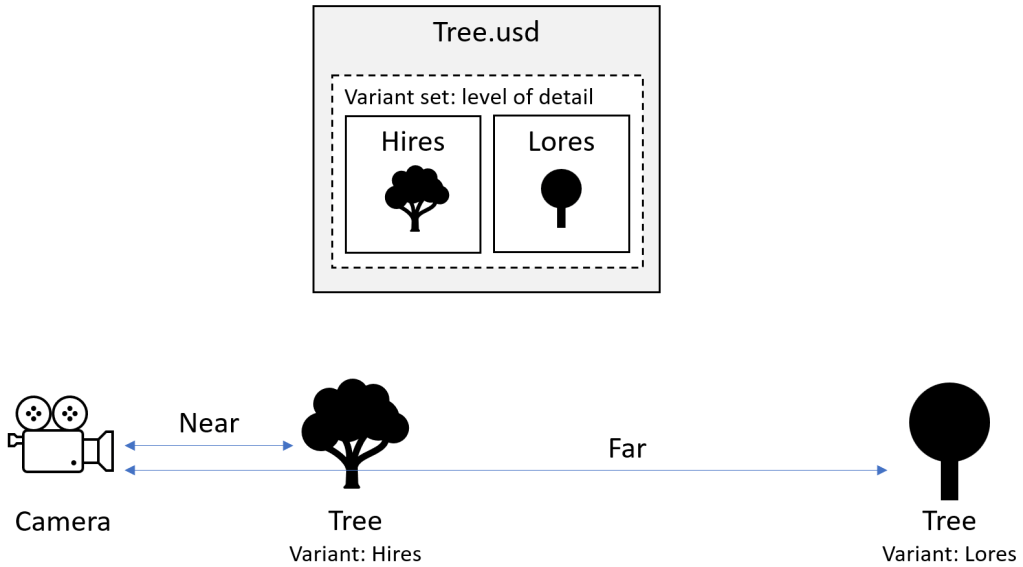
- Houdini supports different Levels of Detail where the choice of which variant to use is based on the distance from the camera to the object
- Different rendering settings for a scene (the default may be tuned for speed, with another one for high quality final render settings)
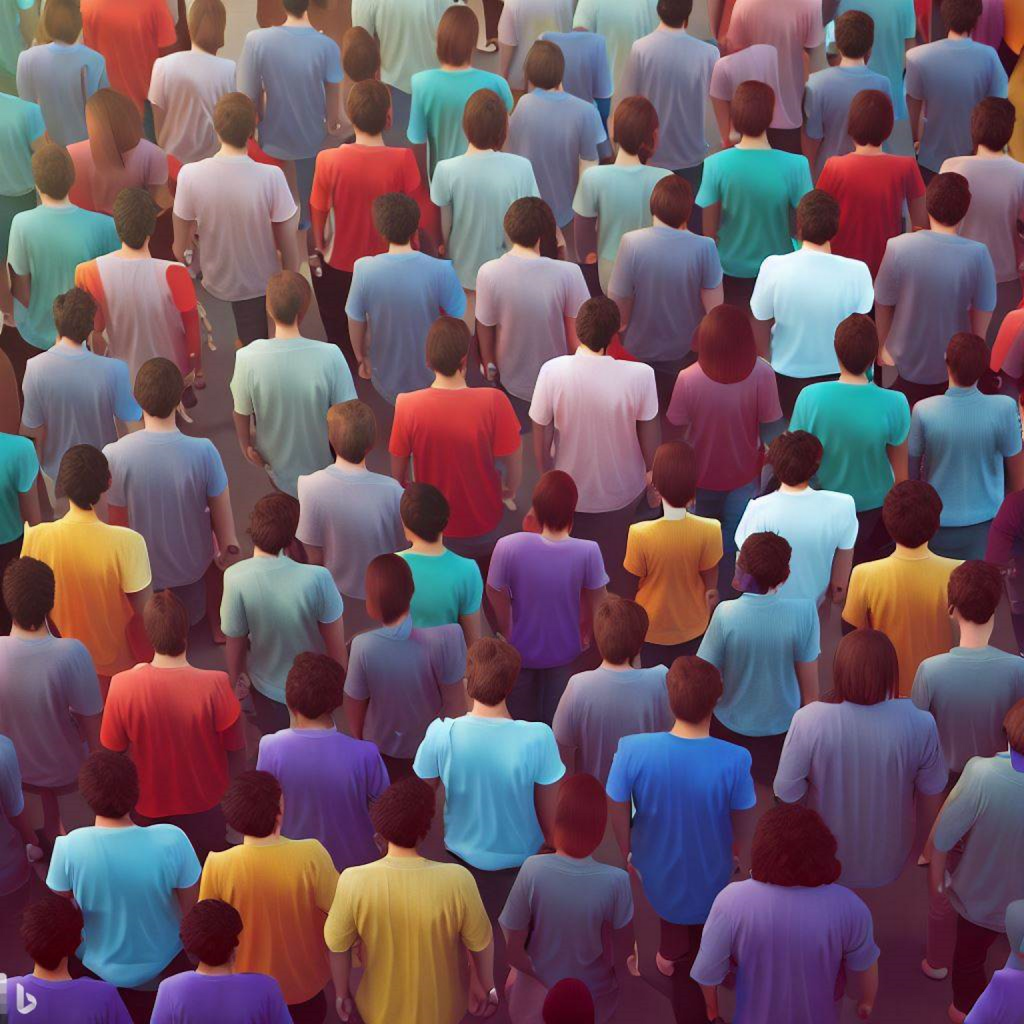
- Combining multiple variant sets on a character to change hair, clothes, scale factor, idle animation clip, can make it easier for a program to generate a crowd of characters with random combinations of variations.
Do you really need variant sets? Most of the time, not really. You can create a layer stack and load different sublayers to get different combinations of prims and properties.
For example, for an animated movie camera shot you could have a “render quality” USD file that has variants of “draft” and “final” inside it. The shot layer stack would include all the contents needed for the shot and the render settings.
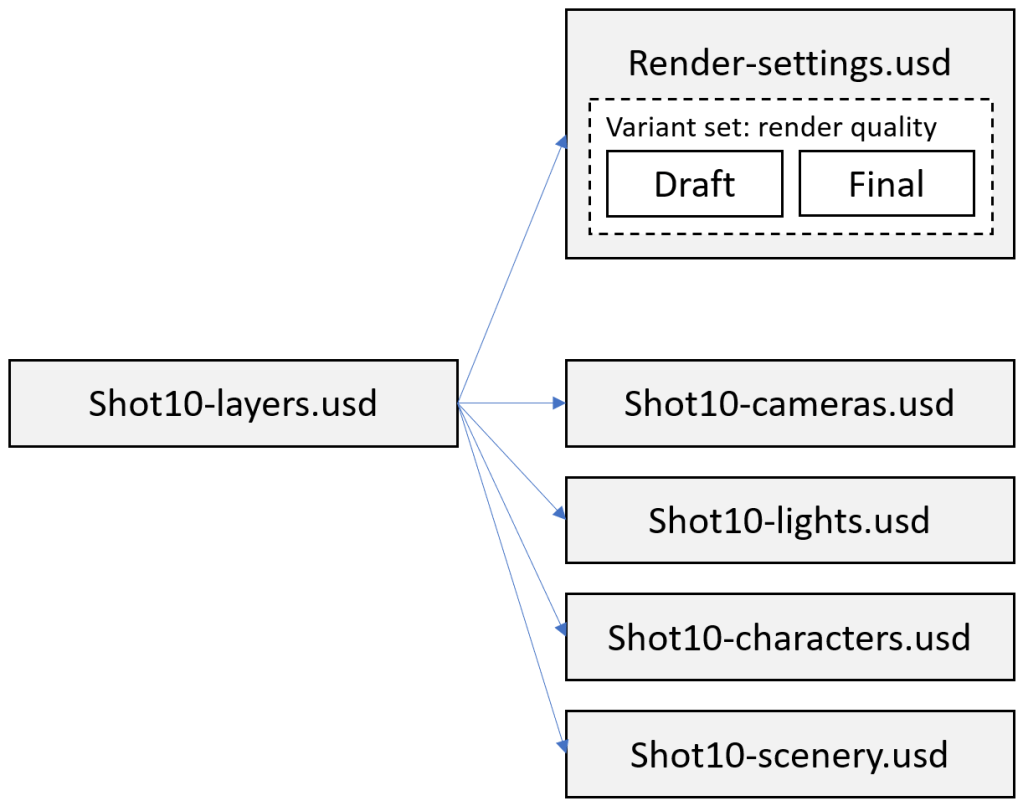
But you would have to edit the “Shot10-layers.usd” to change the variant selector (to flip between draft and final), or have custom rendering code that picked the variant at runtime somehow.
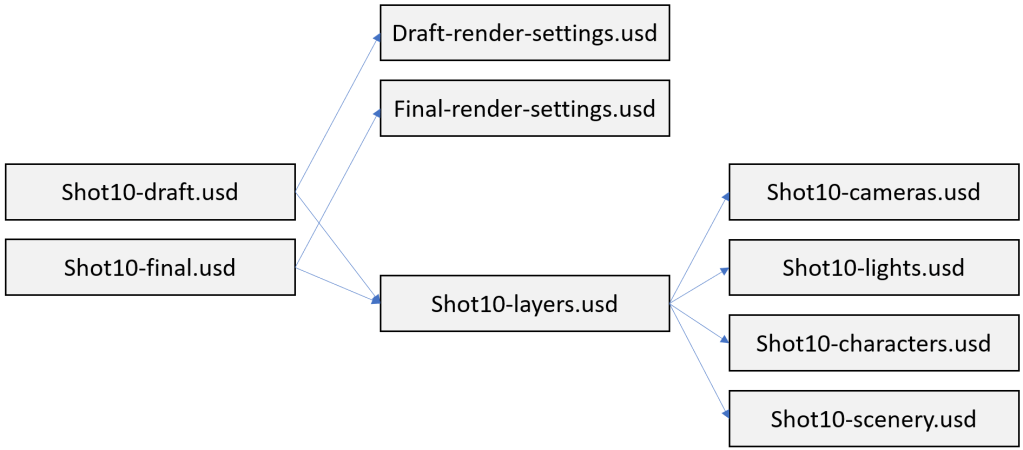
Instead of using variants, you could just have two layer stack files (one for draft and one for final renders). The two layer stack files share many of the same sub layer files, but include different files holding the render settings. You then just pick the draft or final file based on your need.
One example where variant sets is very powerful in the above list is the Houdini “level of detail” (LoD) support. The rendering pipeline chooses which variant to use based on the distance of the object from the camera at runtime. If you have a forest of trees, the nearby trees will render in high detail, and distant trees are simplified (reducing computation overheads) because you won’t be able to see the detail anyway. Houdini supports an “Auto Select LOD node” to pick the appropriate level of detail variant based on the distance of the camera from the object, which must be computed at runtime as the camera (and the object) may be moving during a shot.
The other example of a crowd of characters with variations is also much easier with multiple variant sets. Instead of creating a file per variation, there is just a single file that gets referenced from the stage with the variant selectors specified using overrides (the “over” keyword). If you have 3 variant sets with 4 variations each, that would be 4 x 4 x 4 = 64 files to create. A single file would be easier to manage.
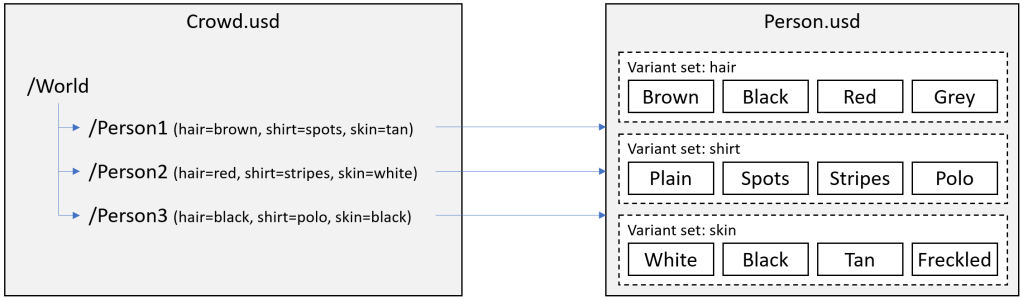
In general variant sets make the most sense to me when you want a computer to select the variant (rather than a human). Have the rendering pipeline programmatically change the variant to use based on context (distance from camera for LoD, GPU card available memory for selecting render quality, etc). The crowd example is similar – you want many variations created for a crowd, but would like a computer to generate them all for you.
If you implement crowds, you should also read up on “instancing”. Instancing can reduce the memory overheads
Note: If you do implement a crowd, it is worth reading up on “instancing”. If multiple prims reference the same external file and have “instanceable” metadata set to “true”, USD can save memory by sharing the same data structure for all instances (like all people in the crowd above). You cannot change the child prims of an instanced prim, but you can change the properties and metadata of the root prim allowing you to specify a different position (Xform properties) and select different variants (via metadata). If you want different animation clips per crowd member, you can use the “skel:animationSource” property on the root prim to change the animation clip per character without breaking the instancing optimization. (See openusd.org for more details.)
Technical Details
To use variant sets you need to register the variant set name with a prim, using prim level metadata. Like most properties, it’s an array, so you use “prepend” (or “append”) to add it to the list of variant sets.
def Xform "tree" (
    prepend variantSets = "levelOfDetail"
) {
    ...
}
You also need to select which variant to use on a prim. This is also put in the metadata.
def Xform "tree" (
    prepend variantSets = "levelOfDetail"
    variants = {
        string levelOfDetail = "far"
    }
) {
    ...
}
Note: early on for me an area of confusion was the “variants =” syntax I kept thinking was defining variants. It’s not. Its selecting the variant (“far”) to use from the variant set (“levelOfDetail”). Its plural (“variants”) because there could be multiple variant sets, in which case you would need a variant selector per variant set.
Then you define your properties and children prims as normal. But beware. Don’t specify a value for properties you want to change by variant set as the “local” value you specify will override the “over” value from the variant set. So declare the property but don’t specify “= <value>” after it. For example, you may declare the primary display color but not express an opinion for its value. See in the following example that “primvars:displayColor” does not specify a value (an “opinion”). The property is declared, but no local value is expressed.
def Sphere "world"
{
    float3[] extent = [(-2, -2, -2), (2, 2, 2)]
    color3f[] primvars:displayColor
    double radius = 2
}
Finally, define each variant of the set. The following example uses variants to control the color of the ball (this example is from openusd.org). Personally, this illustrates how variant sets work, but not when to, or when not to, use variant sets. It defines a “shadingVariant” variant set with support for “blue”, “green”, and “red” which override the primary color property of the root World sphere.
def Xform "hello" (
    variants = {
        string shadingVariant = "green"
    }
    prepend variantSets = "shadingVariant"
)
{
    custom double3 xformOp:translate = (4, 5, 6)
    uniform token[] xformOpOrder = ["xformOp:translate"]

    def Sphere "world"
    {
        float3[] extent = [(-2, -2, -2), (2, 2, 2)]
        color3f[] primvars:displayColor
        double radius = 2
    }

    variantSet "shadingVariant" = {
        "blue" {
            over "world"
            {
                color3f[] primvars:displayColor = [(0, 0, 1)]
            }
        }

        "green" {
            over "world"
            {
                color3f[] primvars:displayColor = [(0, 1, 0)]
            }
        }

        "red" {
            over "world"
            {
                color3f[] primvars:displayColor = [(1, 0, 0)]
            }
        }
    }
}
Conclusions and Further Reading
So, do I plan to use variant sets? Not really. I do not plan to use them for different sets of clothes on a character – I will just use different USD files, sharing sublayer files where possible. Why? It’s good enough and it avoids introducing yet another concept. The only time I am personally likely to use variant sets is for things that make sense for a computer to pick between, like the LoD support (distance from camera), or cases like randomly selecting crowd members. But it is useful to understand what they are and how they work.
There are a few articles around on variant sets, but I found many a bit confusing. The OpenUSD site has some pretty good information on Variant Sets in USD, although the example above of having different colored balls felt a bit contrived to me. It described how things work, not why you would do it.
I also found the “USD in Bifrost” video quite interesting, which got me thinking about generating crowds of people using variants.
 Extra Ordinary, the Series