
I am trying to bring VRoid Studio characters into NVIDIA Omniverse. Omniverse has powerful deformers and particle cloth physics support which I am still exploring to get better movement out of clothes and hair, but they can interact strangely with each other and frequently I am just after some simple bounce bounce for hair a fringe. So I am using this as an excuse to learn OmniGraph in Omniverse – their node-based visual scripting support.
Graph Types
The documentation lists three graph types:
- Action graphs, which can respond to user inputs like key presses, as well as “tick events” due to a frame update
- Push graphs, which are always evaluated per frame (implied automatic “tick events”)
- Lazy graphs, which are evaluated only if some state changes

I get the feeling Omniverse is moving everything towards Action graphs since I think they support push mode via a “tick” events, and lazy graphs via all the other event types (like key presses), but I have not seen this explicitly written down.
Animation Graphs
There are also “Animation Graphs” which also use a similar node system, but with a different set of graph nodes (and not many of them). You can use them to blend smoothly between animation clips, add a “look at” capability to rotate the head, and a filter capability to block certain properties (e.g. so you can use the legs from a walk cycle with the upper body from a different source.
I am waiting for the 105 Omniverse release to see if anything is added here, such as better audio2face integration support for facial expressions, but really animation graphs are out of scope for this post.
Springbone Algorithm

The basic idea of a springbone is to track details such as the last position and rotation of each bone to work out its velocity, then add other influences such as gravity. I am not going to explain the algorithm in detail in this post, but an implementation for VRoid Studio characters (including basic collider support) can be found on GitHub. What is important however is that the algorithm needs to remember state. It needs to know details such as the velocity of movement (typically done by comparing the position last frame to the position in the current frame), with enough maths to implement dampening of the spring.
So how to store this state?
State and Action Graphs
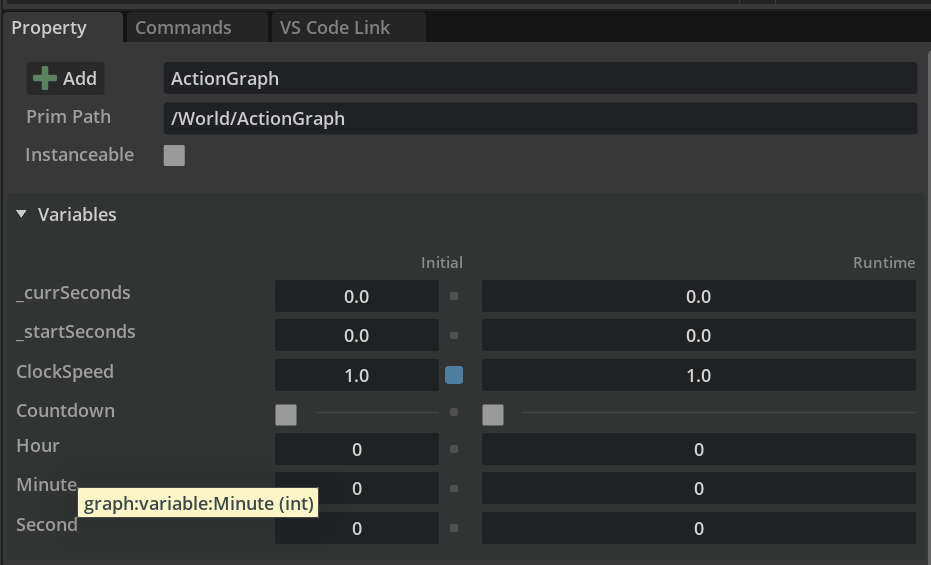
My understanding is while you can create graphs of nodes, including creating your own nodes with Python code, the only way to store state between frames in an action graph is via action graph variables. An action graph can read these variables, evaluate expressions, then update the variables with new values. But there is no way to hide variables.
The “Clock” example from the samples pack has a fairly complex example of an action graph.

The action graph appears to use variables with a leading underscore as a hint they are not intended for external usage, as there is no other way to hide them. For comparison, in Unity, you can write C# classes for behavioral code with public and private fields in the class. Private fields allow state to be kept at runtime, but not appear in the equivalent of prim attributes. (In Omniverse, action graph variables all appear to be public and stored in prim attributes.)

Variables have an initial and current runtime value.
Proposed Action Graph Structure
The Springbone C# code maintains complex internal structures which are not available as variable types. Further, skeleton bones under the prim hierarchy, have deep parent/child relationships that appear to be computed.

For example, the C# code builds up arrays of bone chains using internal classes. Complex types like this are not supported with variables.
Further, bones under a Skeleton prim appear to be generated and updated at runtime, so it feels unsafe to store any state directly in those prims.
So instead, I am thinking to create a hierarchy of prims following the same structure as the hair bones, with references over to the skeleton bone, so action scripts can fetch the bone’s position and rotation settings as needed, saving updated values in prim attributes. This duplicate set of prims is just to allow me to save runtime state data.
Conclusions
In this blog I introduced the building blocks I believe I will need to implement springbones in a Omniverse friendly way. This is to create a new set of prims for each bone chain to allow state to be stored per prim. But that is my next challenge – pulling apart the C# code from the UniVRM GitHub repo and see if I can restructure it as an action graph applied to a set of prim nodes mirroring the bone hierarchy.
 Extra Ordinary, the Series