
NVIDIA Omniverse includes a number of AI based tools, including Audio2Face and Audio2Gesture. Audio2Face takes an audio file and generates facial blend shape animations. Audio2Gesture can take the same audio file and instead generate upper or full body animation clips. But it’s not easy at first blush to combine the two results. In this blog I explain an easy way to merge the two, using OpenUSD capabilities, so you can play them both back together, by leveraging OpenUSD capabilities.
When I searched the NVIDIA forums, I came across a few posts saying it is not currently possible to merge them easily. I believe the reason for this is both tools generate joint (bone) animations (one controls the eyes, the other the rest of the body), and this is a bit tricky to merge without writing Python code. It got around this by discarding the eye animations from Audio2Face. So in this post I take a short cut, but it’s still useful to try the two tools out together.
First, let’s look at what the two tools output. They both output SkelAnimation prims, but the structure of the files are different. (Note: You can only play one SkelAnimation at a time, so our goal is to merge the two outputs into a single SkelAnimation.)
Audio2Face can generate a USDA file with a root /World prim (an Xform) and a nested /World/anim_a2f_export prim (a SkelAnimation). The SkelAnimation lists blend shapes it animates, weights per time interval, curve data, and joints (bones) to animate — in this case the jaw and two eyes. Here is a sample file.
#usda 1.0
(
  ...
  defaultPrim = "World"
  endTimeCode = 5014
  framesPerSecond = 60
  metersPerUnit = 0.01
  startTimeCode = 0
  timeCodesPerSecond = 60
)

def Xform "World"
{
  def SkelAnimation "anim_a2f_export"
  {
    uniform token[] blendShapes = [
      "eyeBlinkLeft",
      "eyeLookDownLeft",
      "eyeLookInLeft",
      "eyeLookOutLeft",
      ...
    ]
    float[] blendShapeWeights.timeSamples = {
      0: [0, 0, 0.031765234, 0, 0.013956557, 0, 0.014667809, ...],
      1: [0, 0, 0.037668083, 0, 0.016648885, 0, 0.016874798, ...],
      2: [0, 0, 0.04011543, 0, 0.017426997, 0, 0.017697679, ...],
      3: [0, 0, 0.04121919, 0, 0.017527085, 0, 0.018005366, ...],
      4: [0, 0, 0.041828267, 0, 0.017392559, 0, 0.018061223, ...],
      ...
      5013: [0, 0, 0.039716065, 0, 0.00041283248, 0, 0.009045716, ...],
      5014: [0, 0, 0.041775048, 0, 0.0011518262, 0, 0.008822976, ...],
    }
    token[] custom:mh_curveNames = [
     "CTRL_expressions_browDownL",
     "CTRL_expressions_browDownR",
     "CTRL_expressions_browLateralL",
     "CTRL_expressions_browLateralR",
     ...
    ]
    float[] custom:mh_curveValues.timeSamples = {
      0: [0.1889416, 0.18306415, 0.18965879, 0.18378134, 0.0017929, ...],
      1: [0.19625255, 0.18934673, 0.19830237, 0.19139655, 0.0051245, ...],
      2: [0.20027047, 0.19307554, 0.20255262, 0.19535768, 0.005705, ...],
      3: [0.20360018, 0.19618292, 0.20603076, 0.1986135, 0.0060764, ...],
      ...
      5013: [0.236049, 0.2219601, 0.236049, 0.2219601, 0, 0, 0, 0, 0, ...],
      5014: [0.232924, 0.2202033, 0.232941, 0.2202205, 0.00004303, ...],
    }
    uniform token[] joints = ["jaw", "eye_L", "eye_R"]
    quatf[] rotations.timeSamples = {
      0: [(1, 0.019, 0, 0.004), (1, -0, 0, -4.51e-8), (1, -0, 0, -2.04e-8)],
      1: [(1, 0.019, -0.000, 0.000, -1.46e-8)],
      ...
      5014: [(1, 0.019, 0, 0.003), (1, -0.007, 0.001, -0), (1, -0.008, 0.001, 0)],
    }
    float3[] translations.timeSamples = {
      0: [(1.1556301, -0.16264372, -5.6515927), (0, 0, 0), (0, 0, 0)],
      1: [(1.1614425, -0.1627137, -5.6496444), (0, 0, 0), (0, 0, 0)],
      ...
      5014: [(0.86151516, -0.13342166, -5.6107664), (0, 0, 0), (0, 0, 0)],
    }
  }
}
Next, let’s look at the output of Audio2Getsture. It does not animate any blend shapes, but it animates many more bones.
#usda 1.0
(
    defaultPrim = "Animation"
    endTimeCode = 5012
    framesPerSecond = 60
    metersPerUnit = 0.01
    startTimeCode = 0
    timeCodesPerSecond = 60
)

def SkelAnimation "Animation"
{
  uniform token[] joints = [
    "Root",
    "Root/J_Bip_C_Hips",
    "Root/J_Bip_C_Hips/J_Bip_C_Spine",
    "Root/J_Bip_C_Hips/J_Bip_C_Spine/J_Bip_C_Chest",
    "Root/J_Bip_C_Hips/J_Bip_C_Spine/J_Bip_C_Chest/J_Bip_C_UpperChest",
    ...
  ]
  quatf[] rotations.timeSamples = {
      0: [(1, 0, 0, 0), (0.9972284, 0.0597316, -0.043104, -0.01043), ...],
      1: [(1, 0, 0, 0), (0.997093, 0.0592477, -0.046430, -0.01162), ...],
      2: [(1, 0, 0, 0), (0.9969503, 0.05880576, -0.0496233, -0.01214), ...],
      5011: [(1, 0, 0, 0), (0.998633, 0.061526, -0.008827, 0.001628), ...],
  }
  half3[] scales.timeSamples = {
      0: [(1, 1, 1), (1, 1, 1), (1, 1, 1), ...],
      1: [(1, 1, 1), (1, 1, 1), (1, 1, 1), ...],
      2: [(1, 1, 1), (1, 1, 1), (1, 1, 1), ...],
      ...
      5011: [(1, 1, 1), (1, 1, 1), (1, 1, 1), ...],
  }
  float3[] translations.timeSamples = {
      0: [(0, 0, 0), (0, 0.9100475, 0.0036163516), ...],
      1: [(-0.00161838, 0, -0.000608713), (0, 0.9100059, 0.0036866), ...],
      2: [(-0.00318615, 0, -0.001231279), (0, 0.9099643, 0.0036112), ...],
      ...
      5011: [(-0.00292058, 0, 0.0219533), (0, 0.909793, 0.0036157), ...],
  }
}
One immediate difference is the Audio2Gesture output does not include an enclosing Xform (/World). So we need to add that extra wrapping layer to line them up. Next, ideally we might want to merge the joint rotations between the two clips, but to keep things easy I use the Audio2Face output blend shapes animation and Audio2Gesture bone animation.
So how to merge the two clips without having to modify them? A claim of OpenUSD is “non-destructive editing” using references and sublayers. Can it be done here?
My first attempt was to use sublayers. Because the nesting was different, I created an additional file that wrapped the Audio2Gesture output in an Xform then referenced the Audio2Gesture output file. This meant the two outputs would have the same structure.
#usda 1.0
(
  defaultPrim = "World"
)

def Xform "World"
{
  def "anim_a2f_export" (
    add references = @./Audio2GestureTake.usda@
  )
  {
  }
}
I then tried to use sublayers to layer one file over the other. I tried a few variations like the following
#usda 1.0
(
  defaultPrim = "World"
  subLayers = [
    @./a2f_export_bsweight.usda@,
    @./Audio2GestureTake.usda@
  ]
)

and
#usda 1.0
(
  defaultPrim = "World"
  subLayers = [
    @./a2f_export_bsweight.usda@
  ]
)

over "World" {
  over "anim_a2f_export" (
    add references = @./Audio2GestureTake.usda@
  )
  {
  }
}
But to no avail! The priority of overriding was a bit more tricky than I realized. Because the Audio2Gesture contribution was being loaded via a reference, it was getting lower priority in the layer stack and would not override the Audio2Face joint properties that were defined directly!
This is where https://github.com/ColinKennedy/USD-Cookbook/blob/master/concepts/asset_composition_arcs.md came in handy. It describes the exact problem I was facing, with a solution. I did not need to add a new wrapping file. I simply created a first prim that referenced the Audio2Face output, then included a nested override with a reference to the Audio2Gesture output. This avoided the sublayer/reference priority problem.
#usda 1.0
(
  ...
  defaultPrim = "World"
  endTimeCode = 5100
  metersPerUnit = 0.01
  startTimeCode = 0
  timeCodesPerSecond = 60
  upAxis = "Y"
)

def Xform "World"
{
  def "animation" (
    add references = @./a2f_export_bsweight.usda@
  )
  {
    over "anim_a2f_export" (
      add references = @./Audio2GestureTake.usda@
    )
    {
    }
  }
}
I then linked it up with a character model (the SkelAnimation has to reference a Skeleton, and the character references the SkelAnimation as its default animation clip to play). The result final result was:
#usda 1.0
(
  ...
  defaultPrim = "World"
  endTimeCode = 5100
  metersPerUnit = 0.01
  startTimeCode = 0
  timeCodesPerSecond = 60
  upAxis = "Y"
)

def Xform "World"
{
  def "character" (
    prepend payload = @./character.usda@
  )
  {
    over "SkelRoot"
    {
      over "Skeleton"
      {
        rel skel:animationSource = </World/animation/anim_a2f_export>
      }
    }
    # ... character mesh and materials ...
  }

  def "animation" (
    prepend references = @./a2f_export_bsweight.usda@
  )
  {
    rel animationSkelBinding:sourceSkeleton = </World/character/SkelRoot/Skeleton>

    over "anim_a2f_export" (
      add references = @./Audio2GestureTake.usda@
    )
    {
    }
  }
}

def Xform "Environment"
{
  ...
}
With the above stage and character model file I was able to load up the Audio2Face and Audio2Gesture output files without modification and use the facial blend shapes from Audio2Face and the body movements from Audio2Gesture combined into the one SkelAnimation clip I could play back. Nice!
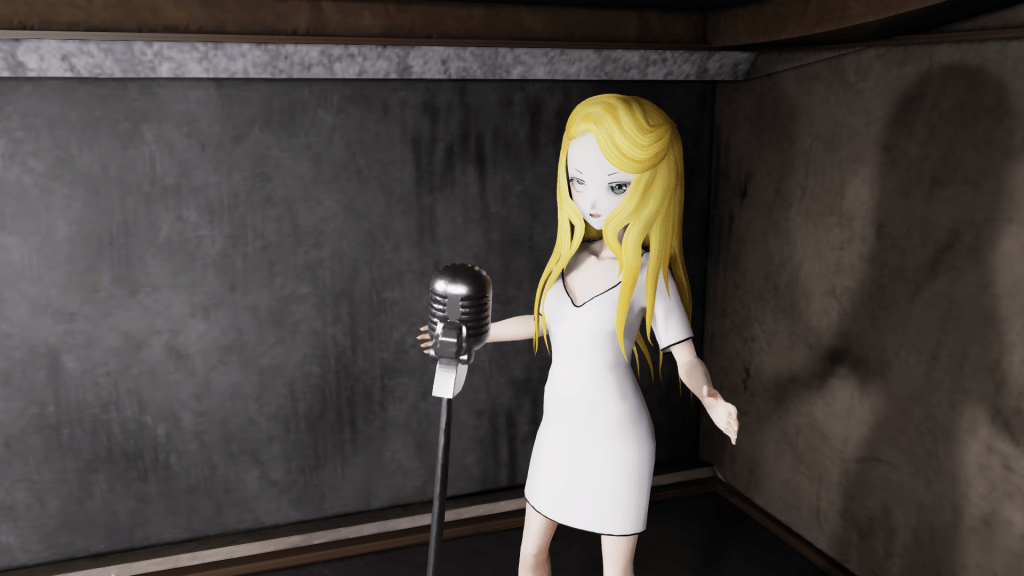
(Yes, I know my character model’s right eye is playing up, but that is unrelated to the above.)
 Extra Ordinary, the Series