
I am working on a web based 3D animation project where you can create an animated video using 3D character models, like a cut scene in a video game. Facial expressions in 3D are frequently animated using “blend shapes” (aka “morphs”, “shape keys”, or “facial landmarks”). Google MediaPipe can be used to live capture a stream of facial landmarks from a web cam to generate a stream of blend shape weights, allowing control of a character’s face. But what if the blend shapes your character has does not match what MediaPipe expects? This is the case in particular for models created using VRoid Studio.
So in this blog I explore how to use machine learning and Google TensorFlow (which can run directly in a web browser) to convert Google MediaPipe outputs to what is required by VRoid Studio characters.
Problem statement
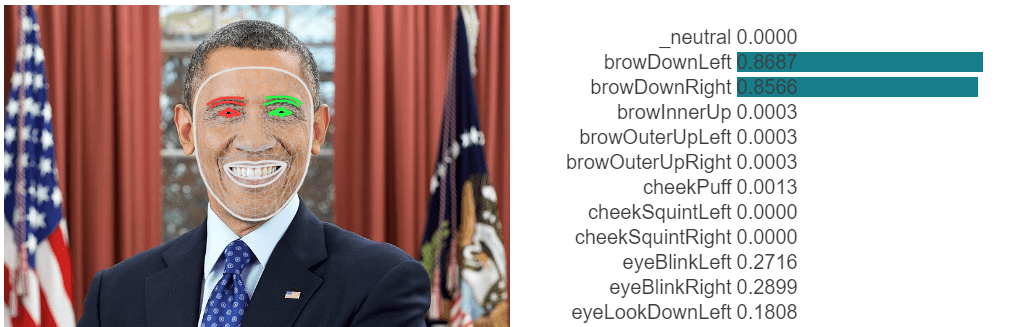
Google MediaPipe captures weights for 52 ARKit defined blend shapes. ARKit was created by Apple to capture different parts of the face. The following shows converting photo into a partial list of blend shapes weights.
I am using characters created by VRoid Studio, free software from Pixar for creating anime style 3D avatars. It can export characters in VRM format (a specification for 3D character models for use in VR apps like VR Chat), which is based on glTF 2.0 with extensions for capturing expressions. This makes it easy to control and render in a web browser, using libraries such as three.js.

VRoid Studio includes a set of blend shapes in exported characters, but not the 52 ARKit blend shapes. It also includes a list of “expressions” which provide an abstraction layer on top of blend shapes. The default expressions are:
- Neutral
- Happy
- Angry
- Sad
- Relaxed
- Surprised
The following are also included as expressions
- Blink (both eyes)
- Left wink
- Right wink
- aa
- ih
- ou
- ee
- oh
Expressions in VRM are predefined combinations of weights for the underlying blend shapes, allowing expressions to be customized per character. Want a more reserved character? Make the smile smaller by reducing the weights! Expressions are convenient for sharing across applications. Any application can look up the expressions supported by a model and display them. Expressions can also adjust texture and material settings, allowing effects like making the face go red for blushing when embarrassed.
The definition of above expressions include weights for the following blend shapes, defined by VRoid Studio.
Fcl_ALL_Angry, Fcl_ALL_Fun, Fcl_ALL_Joy, Fcl_ALL_Neutral, Fcl_ALL_Sorrow, Fcl_ALL_Surprised, Fcl_BRW_Angry, Fcl_BRW_Fun, Fcl_BRW_Joy, Fcl_BRW_Sorrow, Fcl_BRW_Surprised, Fcl_EYE_Angry, Fcl_EYE_Close, Fcl_EYE_Close_L, Fcl_EYE_Close_R, Fcl_EYE_Fun, Fcl_EYE_Highlight_Hide, Fcl_EYE_Iris_Hide, Fcl_EYE_Joy, Fcl_EYE_Joy_L, Fcl_EYE_Joy_R, Fcl_EYE_Natural, Fcl_EYE_Sorrow, Fcl_EYE_Spread, Fcl_EYE_Surprised, Fcl_HA_Fung1, Fcl_HA_Fung1_Low, Fcl_HA_Fung1_Up, Fcl_HA_Fung2, Fcl_HA_Fung2_Low, Fcl_HA_Fung2_Up, Fcl_HA_Fung3, Fcl_HA_Fung3_Low, Fcl_HA_Fung3_Up, Fcl_HA_Hide, Fcl_HA_Short, Fcl_HA_Short_Low, Fcl_HA_Short_Up, Fcl_MTH_A, Fcl_MTH_Angry, Fcl_MTH_Close, Fcl_MTH_Down, Fcl_MTH_E, Fcl_MTH_Fun, Fcl_MTH_I, Fcl_MTH_Joy, Fcl_MTH_Large, Fcl_MTH_Neutral, Fcl_MTH_O, Fcl_MTH_SkinFung, Fcl_MTH_SkinFung_L, Fcl_MTH_SkinFung_R, Fcl_MTH_Small, Fcl_MTH_Sorrow, Fcl_MTH_Surprised, Fcl_MTH_U, Fcl_MTH_Up
For more information, see some of my previous blog posts on blend shapes (part 1, part 2, and part 3).
While the above list may look long, there are many ARKit blend shapes that do not have corresponding VRoid Studio blend shapes, particularly around the mouth and cheeks. This means a perfect mapping cannot be achieved.
The end result is that there are multiple paths to get a VRoid Studio character to work with Google MediaPipe
- Convert 52 ARKit weights to 6 VRM expressions (angry, happy, …), plus blinks and mouth positions
- Convert 52 ARKit weights to the closest VRoid Studio blend shapes (_BRW_, _EYE_, _HA_, _MTH_)
- Add ARKit blend shapes to the character
So let’s use these real life challenges to explore different machine learning strategies.
Converting ARKit blend shapes to VRM Expressions
The first step is to understand the data we have available. In this case, our input data is a set of 52 numbers between 0 and 1 representing the weight of different facial features. The output is a set of 6 numbers between 0 and 1 representing weights for VRM Expressions Neutral, Happy, Angry, Sad, Relaxed, and Surprised. (I will come back to eyes and mouth positions later.) We want a machine learning model to predict the correct expression based on the 52 ARKit generated blend shape weights.

In this case, we can create a set of “training” data. We record a group of users making requested facial expressions in front of a web cam. This is then captured via Google MediaPipe and converted to ARKit blend shape weights. Each captured frame is a new set of input data values that should map to the corresponding expression. We build up a set of data with inputs (the 52 separate ARKit weights) and outputs (the 6 expression weights). The output weights are 1 for the target expression, 0 for everything else.
The Google TensorFlow code lab “Making Predictions from 2D Data” demonstrates code for implementing this approach (the example has a single input and output number, but it’s fairly simple to adjust the code to use a vector of numbers). Because the inputs and outputs are numbers, it is a “regression” task. Behind the scenes, the machine learning engine is trying to work out the mathematical relationship between input and output weights based on provided training data. This process is called linear regression. Because we supply a set of correct output values per set of input values as training data, it is an example of “supervised learning”.
We could have implemented this using classification instead of regression. In classification we would have picked the single most appropriate expression. But we want the expression strength, not just a selection, so regression is more appropriate.
But what about eye blinks and mouth controls?
Taking eyes first, the outputs are how closed the eye lids are, together or individually left and right. This might seem simple – just train a separate model up for closing the left eye and the right eye and don’t bother with the blink blend shape that closes both eyes together. The problem with this approach is the end result can look creepy. Humans blink both eye lids perfectly together (unless they are purposely winking). If one eyelid closes a bit before the other (due to error factors in the capture of facial features), it looks “off”. So it is actually better to train the model to generate a blink (both eyes) as the norm, and separate left and right eye winks only when it is clear that is what is happening.
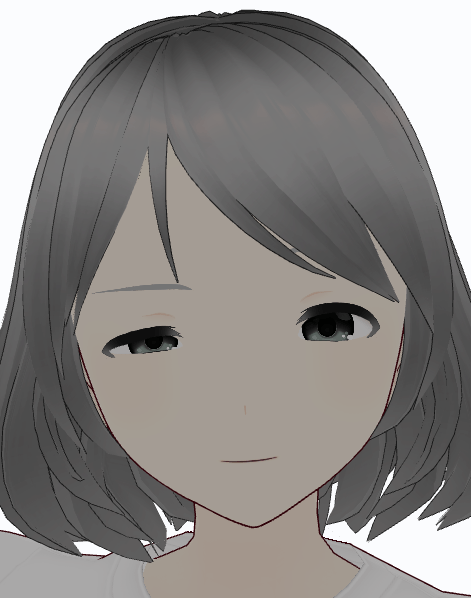
Lesson: understanding your data helps you create better models. Don’t throw data at machine learning and always expect perfect results. This is why data scientists exist – they understand what approach to use and when.
Moving on to mouth controls so the mouth moves when the character is talking, should we create a separate model for them as well? We could, but we need to be careful. The shape of the mouth varies for both emotions and sounds. If you are smiling while talking, your mouth stretches wider. This means the set of emotions and mouth position data is not independent. So while we could create separate models, it is safer to use one model can then consistently decide between smiles or mouth positions for talking. They key is to provide training data for combinations of emotions and mouth positions (happy + ee, happy + aa, sad + aa, etc). This allows machine learning to come up with internal rules such as “a wider mouth without cheek movements is more likely to be an ee sound than smiling”. Machine learning avoids a human trying to come up with such rules by hand.
Convert ARKit to separate _BRW_, _EYE_, _HA_, _MTH_ blend shapes
The above example was using Google MediaPipe to identify expressions (plus mouth movements and eye blinks). The assumption is the VRM defined expressions for a character are appropriately tuned for the character. An alternative approach is to try and match the overall look of the face without understanding what the expression is.
But how to convert raw ARKit blend shape weights to VRoid Studio blend shapes? The problem here is that we don’t have much training data. We can ask a user to pose for “Happy” and “Angry”, but we don’t have weights of individual blend shapes to train from.
This opens up a different form of learning – “unsupervised learning”. We still have a set of inputs and a set of outputs we want, but we don’t have training data with inputs and outputs. Instead, the best we can do is compare the meshes formed by sets of inputs and outputs. If the meshes are similar, that is a good result. So instead of providing example answers, we provide a “cost function”. To train the system, we generate a series of random inputs, then try to find a good set of outputs using an approach such as “gradient descent”. An “optimizer” tries to adjust some of the weights and works out if that was better or worse (by re-evaluating the cost function). It then keeps making changes until it thinks that making more changes won’t improve the results significantly or a maximum number of iterations has been reached.
Is this approach perfect? No. Gradient descend in particular you can think of being like a person on a set of hills. It tries to walk downhill from wherever it starts. It can get stuck in a valley, without realizing that going over one more ridge would get it completely out of the hills. But it does not require any training data. It “tries things” and learns from the results, rather than learning for provided correct answers. Give it enough samples to learn and even if there are some errors it will hopefully overall come up with a decent solution.
TensorFlow supports this approach as well, resulting in a matrix of weights per output. Effectively sum up all the input values multiplied by weights, with some math to normalize the results, to generate each output value. Machine learning techniques were used to compute the matrix of weights.
Oh, and is real life always this clean? Nice arrays of input and output numbers? Of course not! In VRoid Studio, the shocked expression also reduces the size of the iris texture. So we probably want a mix of capturing emotions and facial expressions to generate the final result. (There are no ARKit blend shapes to adjust iris sizes.)
Add your own ARKit blend shapes
The last option is to add ARKit compatible blend shapes to characters. Some people have created versions of VRoid Studio characters with ARKit blend shapes. The challenge is over the different release of VRoid Studio, character meshes have changed slightly (and if you open a VRM model in Blender and then save it again, the mesh may be “optimized”, again changing the mesh structure). Blend shapes work by specifying delta movements per vertex, so if the mesh vertexes change, the blend shapes need to be updated at the same time or else they will not work correctly.
This approach does not involve converting inputs weights to output weights. Instead the goal is to create a set of ARKit blend shapes to add to VRoid Studio characters.
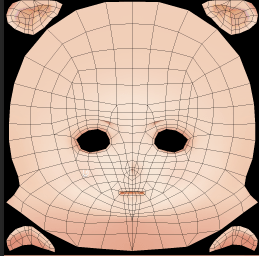
Some example characters with ARKit blend shapes can be found here: https://github.com/hinzka/52blendshapes-for-VRoid-face.
A male and female character are provided as different meshes and textures have always been used to take into account the different physical dimensions.
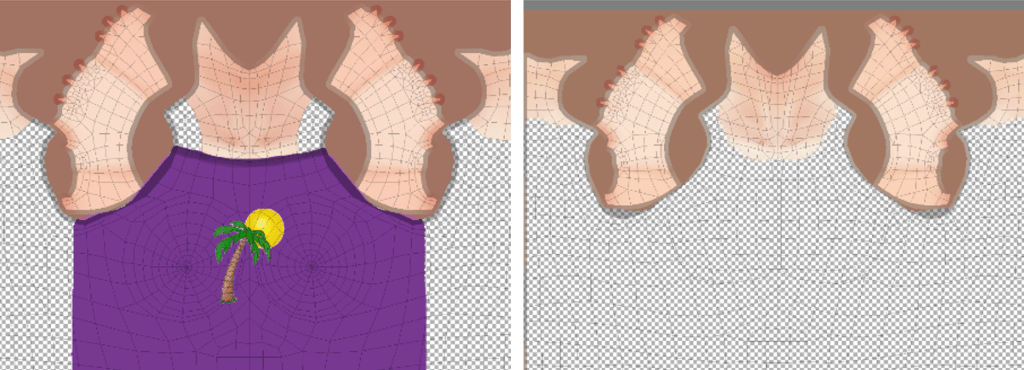
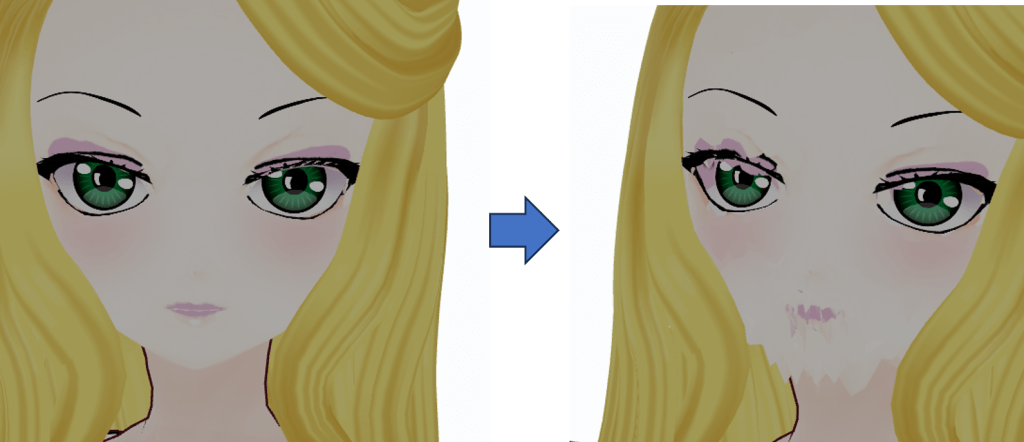
So how can we map the provided blend shapes to a new character with a different mesh? First, we look for what we have in common. In this case, it’s the textures (the PNG files). While the vertices of meshes has changed over time, the textures have not. So what we can do is work out a few vertices in the source blend shape close to the destination blend shape and average their values. This allows us to transfer blend shapes between meshes. To work out if a vertex in the source mesh is “close” to the destination mesh (for two characters with different facial proportions), map the 3D mesh vertex to the 2D position in the texture file and compare that. VRoid Studio works by changing the face by stretching mesh proportions. It does not change the texture file. That means we have a common set of reference points – (X, Y) coordinates in the texture file.
So where is machine learning required in this case? It isn’t! At that may be the final lesson. Machine learning is cool and can be used to solve different problems, but sometimes just thinking about a problem differently may present a solution that does not require it.
So is this approach trivial? Well, unfortunately not. Finding nearby vertices is not enough as there are parts of the mesh, especially around the lips. The points along the upper and lower lips are physically close, but you must not use the blend shape movement of the wrong lip.
Wrapping up
I am still thinking about which approach to proceed with in my own project. I can either map ARKit weights to VRoid Studio weights, or I can add additional blend shapes and avoid the mapping problem. The advantage of the latter is I get greater depth in expressions. The advantage of the former is it can be used without changing existing avatar files.
From a machine learning perspective, I hope this example has provided a few concrete use cases. We learned:
- Supervised learning is where sets of inputs and outputs are provided to learn from
- Unsupervised learning where a cost function is used instead of knowing what good outputs are
- Avoiding learning where changing the problem statement just avoided machine learning altogether!
For me a bonus of using TensorFlow in particular is that it can run inside a web browser, letting me do more processing in the client without having to worry about cloud based backend services.
 Extra Ordinary, the Series